AI security for the agent era
Find, score and protect every agent.

Trusted by security teams from fintech to pharma.












Don't ban AI. Don't ignore it.
Secure it, without slowing anyone down.
Every agent, skill and MCP server in one inventory. Scored by what it can reach and mapped to the device it runs on.
Stands on its own, with value in about two weeks. It inventories and scores the whole route, from person to action.
Discover
Find every AI asset across endpoints, SaaS and AI platforms, mapped to the device it runs on.
Score
Rate each one from 0 to 10 by what it can reach.
Shrink
Retire what nobody needs, so fewer, known assets remain.
Control what agents do while they run. Some risk only shows up at runtime.
Scoped by what step 1 finds. Allow, warn or block at any step, from the person to the action.

Detect
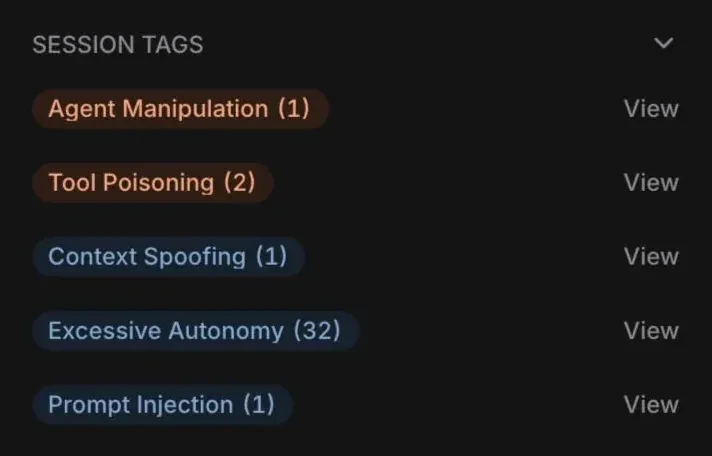
Catch prompt injection and data leaks as they happen.
Enforce
Allow, warn or block at any step. Risky steps wait for a person to approve.
Replay
Keep a replayable record of every session.
Every policy match becomes an incident. With the context to act on it.
Each one explains what happened, why it matters, what to do and who it affects. Act globally or per instance, then resolve it as handled, expected or a false positive.

Find and control AI across SaaS and every endpoint. Both estates in one governed record, scored from the same evidence.
Six asset types, wherever agents run. Alongside your existing EDR and SASE tools.
One console. Every AI estate.
- Cloud Agents
- Copilot Studio
- AWS Bedrock
- ServiceNow Agents
- Coding Agents
- Copilot
- MCP Servers
- Skills
- Asset Metadata
- Risk Scoring
- Vendor Intelligence
- Supply Chain Risk
Run Radar, Surface and AIRiskDB from one control plane, on one inventory.
What changes
Control you can see, and prove.
Questions, answered. The short version of what security teams ask us.
What is SuperAlign?
SuperAlign is an AI security platform for enterprises with two layers. Asset security finds the AI agents, MCP servers, skills, browser extensions, IDE extensions and models running in a company, scores each one from 0 to 10 by what it can reach and maps it to the device it runs on. Runtime security then watches what those agents do while they run, catching prompt injection and data leaks and letting security teams allow, warn or block each step.
Does SuperAlign secure AI at runtime, or only inventory it?
Both. Beyond the asset inventory, SuperAlign protects AI interactions at runtime. It catches prompt injection and data leaks as they happen, and applies allow, warn or block policies at any step of a session, from the person and prompt through skills, MCP servers and tools to the data touched and the final action. Risky steps, such as an agent writing to production, wait for a person to approve them, and every session is recorded so it can be replayed.
What is the difference between asset security and runtime security?
Asset security answers what AI is running and what it can reach: an inventory of every agent, skill, MCP server, extension and model, scored by risk and mapped to its device. Runtime security answers what that AI is doing right now: it inspects prompts and agent actions as they happen and enforces policy on them. Asset security delivers value on its own in about two weeks, and its findings scope where runtime policies apply.
Which AI assets does SuperAlign discover?
Six asset types: agents, skills, MCP servers, browser extensions, IDE extensions and models. That covers SaaS agents such as ChatGPT, Claude.ai, Gemini and Notion AI, local agents such as Claude Code, Codex CLI and Cursor, and agents built on AI platforms such as Agentforce, Copilot Studio, ServiceNow, Databricks and Bedrock.
How is SuperAlign deployed?
Surface, the device sensor, is pushed through your MDM (Jamf, Intune, Workspace ONE or Kandji) to macOS, Windows and Linux, with a managed browser extension. Radar, the cloud sensor, connects to your AI platforms once and pulls in their agents and telemetry, with nothing to install on devices. First results arrive within the hour.
How does SuperAlign score AI risk?
Each asset is pre-scored in AIRiskDB from 0 to 10 based on what it can reach: data, tools, systems and permissions. Policy matches become incidents that explain what happened, why it matters, what to do and who it affects, and findings map to CWE and the OWASP agentic (ASI) risks.
Does SuperAlign replace EDR or SASE?
No. SuperAlign works alongside existing EDR and SASE tools. It adds visibility and control at the AI layer: which agents exist, what they can reach and what they do, which network and endpoint tools do not see.
What does a SuperAlign pilot involve?
A two-week discovery scan across 25 to 100 users, deployed through your MDM. You keep the inventory, the scored risk view and a full session record whether you buy or not, and the pilot costs nothing.
What does SuperAlign not cover today?
Fully custom agents built in-house with frameworks such as LangGraph, CrewAI or AutoGen are not covered today.
Give us two weeks.
We’ll show you what’s running.
Deploy on your MDM across 25–100 users. Keep the inventory, scored risk view, and a full session record—whether you buy or not.